Smithtown iPad
  • Home
  • General Apps
  • High School & Middle School
    • Business
    • ELA
    • Foreign Language
    • Math
    • Music
    • Science
    • Social Studies
  • Elementary School
    • ELA
    • ELL
    • Math
    • Science
    • Social Studies
    • Art
  • Special Education Apps
  • Useful Links
  • "App of the Month" Blog
  • Credits
  • Training & Workshops

app of the week - penultimate

6/3/2013

0 Comments

 
Picture
Penultimate:  Penultimate is an app that allows you to create notebooks.  Unlike Evernote, Penultimate allows you to use natural handwriting in your notebooks giving you the ability to jot down notes, make sketches and anything else you can do with a pen or pencil.  The best part is that Penultimate now syncs with Evernote so your notebooks are available anywhere you have an Internet connection.  Check out this short video to learn more about Penultimate. . . by Donna DeLuca

http://www.youtube.com/watch?v=CvlPVsXoZuk

0 Comments

app of the week - common core standards

5/27/2013

0 Comments

 
Picture
Common Core Standards:  This app provides a quick reference to the Common Core Standards.  Standards can be searched by subject, grade and subject category.  Simply select a curriculum area, a grade level and a particular standard to obtain the details on that standard.

This app also contains a "Resources" section which provides a variety of information including: how to read the standards, research on the standards, indicators of college and career readiness, text exemplars, sample performance tasks, samples of student writing, information on designing math courses and much more.  This is a handy resource for teachers and administrators. . . by Donna DeLuca.

0 Comments

App of the week - word mover

5/20/2013

0 Comments

 
Picture
Word Mover:  This app from ReadWriteThink and the National Council of Teachers of English gives students the opportunity to select and manipulate words from provided word banks.  The description from the App Store states that it "is used to supplement classroom instruction, reinforce concepts taught in class, and offer increased student engagement."  Teachers will find a number of uses for this app. One of my favorites is creating "found poetry," which can be done with students at various grade levels. I recently used this app with sixth graders who were reading Dragonwings as part of the Embracing Diversity module in ELA. We listened to Martin Luther King's "I Have a Dream" speech and discussed connections to the characters and theme of Dragonwings. We then used the pre-installed "I Have a Dream" word bank to create found poetry. 

The app has a “shuffle” feature in the word bank that helps students avoid simply re-creating the original text.  There is also the capability to add a word or words if necessary.  This app could be used with younger students who are exploring graphophonics; for example, they could go on a “scavenger hunt” to locate words containing a particular phonogram from within a provided word bank. A variety of background choices offer a nice finishing touch. . . by Sheila Tobin Cavooris


0 Comments

app of the week - readability

5/13/2013

0 Comments

 
Picture
Readability:  This is a great app where you can remove all ads or banners from a website and just have the content you want to read.  It also offers the options of reading now or saving the site to read later. Can be used on the iPad and on your computer. . . by Laura Bishop-Scioli.


0 Comments

app of the week - nearpod

5/6/2013

0 Comments

 
Picture
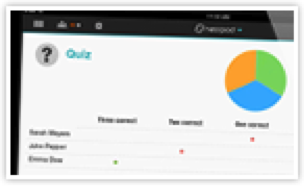
Nearpod is a cool app that allows you to create interactive presentations and/or lessons using a set of iPads.  It allows you to create multimedia presentations and then share them with your class.  As a teacher, you control the activity.  As you page through your presentation, students will see exactly what you want them to see.  You can set up questions for students to respond to and you will be able to measure the student results. . . by Donna DeLuca

The following information is from the nearpod website – www.nearpod.com.

Picture
Create interactive classes with ease
:  Using the Nearpod Content Tool, simply upload a pdf or start a new presentation and add interactive features. 
Picture
Share content in real time:  
Push information, questions, and activities to students’ mobile devices.    
Picture
Engage students:  
Multimedia content harnesses students’ attention, keeping them focused and minimizing off-task behavior.

Picture
Control students' devices:  
Teachers can see all student activity in real-time, check attendance and identify students who log out from Nearpod.    
0 Comments

app of the week - evernote

4/29/2013

0 Comments

 
Picture
Evernote is a great app for note taking and organization.  It allows you to create notebooks for just about any purpose.  I use it to keep notes for a variety of projects, committees, clubs and personal use.  In addition to note taking, Evernote also allows you to add pictures using the camera or from your camera roll.  It also allows you to add audio to your notes.  All notebooks can be shared with others either by providing a public link or inviting specific individuals.  The best part is that all notebooks can be synced to your computer or other mobile devices so that your notes are with you wherever you go. . . by Donna DeLuca

0 Comments

app of the week - ted

4/22/2013

0 Comments

 
Picture
TED is an amazing app that has access to more than a thousand talks and speeches from thinkers, innovators and other fascinating people around the world. The app updates almost every day with new talks. You may sort the featured library by recency or popularity, browse talks by tags, themes, or language, and share your favorite talks with your friends. You may also download full videos to your device and watch them when you’re offline.

What I really love about this app is the “Inspire Me”category. You can choose inspirational talks that are courageous, funny, beautiful, jaw-dropping, and more. You can also narrow your choice by the length of the speech. So if you need a 5 minute pep talk or a bit of humor to start your day, you can specify the length of the inspirational talk.

Many of the talks are appropriate for students as well. The tags allow you to search a particular subject and then you can see the length, posting date and descriptive words. . . by Louise Prescott


0 Comments

app of the week - atlas of the world

4/15/2013

0 Comments

 
Picture
Atlas of the World is a Digital Atlas of the United States and the World, with satellite images of 200 famous landmarks. The world map lets you view data by country, while the United States map can be viewed at both state and county levels. 

The articles on each state or country provide historical information as well as images including the flag. The Landmarks section contains information on 260 world landmarks. The satellite images are beautiful and the articles contain several additional images of the landmark.

Data is provided from the World Bank, Wikipedia and the US Census. An Internet connection is required for this app to work properly.  I would recommend this for fifth grade and up. . . by Louise Prescott

0 Comments

app of the week - tiny fractions

4/8/2013

0 Comments

 
Picture
TinyFractions is a fun way to teach identifying, comparing, reordering, equivalency, simplifying, and basic addition and subtraction of fractions.  It offers a learning section and a review section for each skill.  As the students master a skill the app allows them to move onto the next
level. . . by Laura Bishop-Scioli


0 Comments

app of the week - toontastic

4/1/2013

0 Comments

 
Picture
Toontastic is an app that enables students to become storytellers.  Students are able to draw their own illustrations or use stock images while practicing the concept of story mapping as they tell their stories.  The pictures can then be animated and students are able to record themselves narrating their work.  This app creates a wonderful platform to engage students in the writing process.

My fourth grade classes have been using this app to give life to the folktales they have been writing in library class. . . by Laura Bishop-Scioli


0 Comments
<<Previous

    Archives

    June 2013
    May 2013
    April 2013
    March 2013
    February 2013
    January 2013

Smithtown Central School District
2013-2014